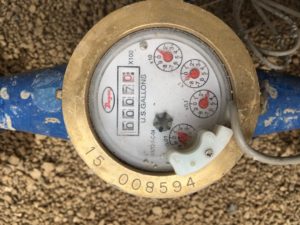
The project displays the water usage for a lawn irrigation system. Our new landscaping uses a Rachio Pro smart irrigation system (http://rachio.com/pro). The system is very useful and has a smart phone interface that includes a display of the water usage. This water usage is an estimate based on the time the sprinklers are on and the type of sprinklers selected during the installation portion. To get a more accurate reading we installed a Dwyer water meter inline with the irrigation. The meter provides an analog readout of the cumulative water usage directly on the meter. It also has a wired output which we connected to our project to remotely monitor the water usage.
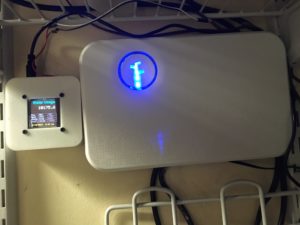
Our initial prototype is using an Arduino Uno board and a 1.5″ OLED from Adafruit. We have a second prototype using an Adafruit Trinket Pro in place of the Uno board. Both use a DS3231 real-time clock module to keep time. This early version has some basic datalogging to the SD card. A few times a minute is writes the date, time and water measurement. On power up, it reads these values taking the last in the list as the current value.
The initial testing is showing a discrepancy between the reported water usage and what is shown on the measure dial. The circuit appears to be picking up some extra readings making for an over count.
Given it’s a prototype there is still a bit of work to do. There are also several hardcoded values, such as the previous year’s usage. It also requires the SD card and RTC to be initialized properly.
/*
 Program: WaterMeter

 Description: Displays the water usage. The dwyer water meter provides a grounding pulse for every 0.1 gallons of water that flows.
 The circuit reads the water usage pulses and displays various cumulative values.

 Circuit:
 * 1.5" 128x128 OLED w/microSD holder, $39.95, https://www.adafruit.com/products/1431
 * RTC: $8.99, https://www.amazon.com/gp/product/B00HF4NUSS/ref=od_aui_detailpages00?ie=UTF8&psc=1
 * Adafruit Trinket Pro $9.95, https://learn.adafruit.com/introducing-pro-trinket/overview
 * Dwyer Multi-Jet Water Meter w/ Pulsed Output, WMT2-A-C-04, 1" NPT, 50 GPM, Brass Body, $126,

 * (4) 2.5 x 2 bolts and nuts
 * (4) 1" wood screens
 * Button -- used for debug to simulate meter

_r01 used SPI 128x64 Monochrome OLED screen
_r02 added RTC, 128x128 1.5" Color OLED
_r03 adjusted display position, add SD card but conflicts with GFX
_r04 added internal interrupt, glitchy
 table of additional totals and previous numbers, psuedo history
_r05 removed WiFi code
_r06 added SD card, logo splash, RTC isn't working now
_r07 first attempt to write and read to SD card, writes fixed string to SD at setup, RTC fixed
_r08 initializes data from SD files and writes date
SD_r02 datalog written with date, csv read in
SD_r03 datalog written every 11 minutes
SD_r04 daily, monthly cumulatives added
SD_r05 added weekly cumulatives

TODO LIST:
 - clean of differences in prototype hardware
 - initial SD card write to put column headers
 - clean up GUI, calculate last year averages and totals
 - verify is interrupt pin debounce
 - create a initial setup (time, ytd, current) currently hardcoded initial value
 - how to handle power loss
 - datalog info, with backup/startup; use timer to periodically record w/timestamp
 - networking; current display and download SD card files
 - move some code to .h file
 - add display off/on button
 - add power management sleep


 Pin Use:
 A0
 A1
 A2
 A3
 A4 RTC I2C DATA
 A5 RTC I2C CLOCK
 D0
 D1
 D2 EXTERNAL INPUT - METER
 D3
 D4 TFT SD CARD CS
 D5 TFT DC
 D6
 D7
 D8
 D9 TFT RST
 D10 TFT CS
 D11 TFT MOSI
 D12 TFT MISO
 D13 TFT CLK
 SDA
 SDD

RTC module wiring - look for text on the board,
+ power (5V)
D SDA
C SDC
NC
- ground
Partial diagram here: http://www.l8ter.com/wp-content/uploads/2011/09/DS3231fritz.png

 */

#include <Wire.h>
#include <SPI.h>
#include <SD.h>
#include <Adafruit_GFX.h>
#include <Adafruit_SSD1351.h>
#include <Fonts/FreeSansBold9pt7b.h>
#include <Fonts/FreeSansBold24pt7b.h>

#define DS3231_I2C_ADDRESS 0x68

// You can use any (4 or) 5 pins
#define sclk 13
#define miso 12
#define mosi 11
#define cs 10
#define rst 9
#define dc 8 // fix this 8 for Trinket 5 for Arduino
#define SD_CS 4

// Color definitions
// 5b R, 6b G, 5b B
#define SHIRT_BLUE 0x3AB5 // Blue
#define DARK_GREEN 0x5E0 // Dark Green
//#define LT_GREY 0xCE9A // Light grey
#define DARK_GREY 0x5AEB
//#define GREY 0x7BEF
#define GREY 0x2104

#define BLACK 0x0000
#define BLUE 0x001F
#define RED 0xF800
#define GREEN 0x07E0
#define CYAN 0x07FF
#define MAGENTA 0xF81F
#define YELLOW 0xFFE0
#define WHITE 0xFFFF

#define LOGGING_FREQ_SECONDS 600
#define MAX_SLEEP_ITERATIONS LOGGING_FREQ_SECONDS / 8
int sleepIterations = 0;
volatile bool watchdogActivated = false;

float CumWater;
float DailyH20;
float WeeklyH20;
float MonthlyH20;
float YTDH20;

//JPC TODO IF APPLICABLE
float LY_DailyH20 = 199.5; // last years value
float LY_WeeklyH20 = 1496.0;
float LY_MonthlyH20 = 5984;
float LY_YTDH20 = 74052.0;
int x, y = 0;
const int TableX = 3;
const int TableY = 69;

// variables for interrupt pin portion
const byte interruptPin = 2;
volatile byte state = LOW;

// variables for RTC
byte prev_second, prev_minute, prev_hour, prev_dayOfMonth, prev_month, prev_year = -1;

// display
Adafruit_SSD1351 tft = Adafruit_SSD1351(cs, dc, rst);

// bitmap logo splash screen
File bmpFile;
int bmpWidth, bmpHeight;
uint8_t bmpDepth, bmpImageoffset;

File dataFile;
int len = 3;

byte c_second, c_minute, c_hour, c_dayOfWeek, c_dayOfMonth, c_month, c_year;
byte p_second, p_minute, p_hour, p_dayOfWeek, p_dayOfMonth, p_month, p_year;


// --------------------------------------
// Watchdog timer interrupt ISR
ISR(WDT_vect)
{
 watchdogActivated = true;
}
// end Watchdog ISR
// --------------------------------------


// --------------------------------------
void setup() {

 // setup watchdog timer
 noInterrupts();
 MCUSR &= ~(1<<WDRF); // MCU status register, watchdog reset
 WDTCSR |= (1<<WDCE) | (1<<WDE); // watchdog control register, WDCE WDE bits
 WDTCSR = (1<<WDP0) | (1<<WDP3); // watchdog control register, presalcer 8s is largest
 WDTCSR |= (1<<WDIE); // watchdog control register, enable no reset
 interrupts();

 Serial.begin(9600); // initialize serial communication

 pinMode(cs, OUTPUT);
 digitalWrite(cs, HIGH);

 // setup external interrupt pin
 pinMode(interruptPin, INPUT_PULLUP);
 attachInterrupt(digitalPinToInterrupt(interruptPin), meter, FALLING);

 Wire.begin();

 // setup real time clock
 //Initial use of RTC set the time, uncomment to set time, then comment out to keep RTC time
 // DS3231 seconds, minutes, hours, day, date, month, year
 //setDS3231time(45,59,23,7,31,12,16); //12/31/2016 Sat 12:59:45pm
 //setDS3231time(15,1,9,6,6,05,17); //5/6/2017 Sat 9:01am
 //setDS3231time(50,5,0,3,23,05,17); //5/23/2017 Mon 12:04:50am

 // setup display
 tft.begin();
 tft.setRotation(2);

 tft.fillScreen(BLUE);
 tft.setFont();
 tft.setTextSize(1);
 tft.setTextColor(WHITE);
 tft.setCursor(0, 0);

 //tft.println(F("Initializing SD card"));
 if (!SD.begin(SD_CS)) {
 tft.println(F("SD failed!"));
 return;
 }
 //tft.println(F("SD OK!"));

//hardcoded splash screen file, won't work if SD card not preloaded with image
//commented out to save space, code was getting too big for Trinket
// bmpDraw("primo128.bmp", 0, 0);
// delay(3000);

 String inString = ""; // string to hold input
 String dDate = "";
 String dTime = "";

 tft.println(F("Reading previous data"));
 tft.print(F("Please wait..."));
 int index = 0; // track place in .csv row: date, time, cum, daily, week, month, ytd
 int records = 0;
 int modulo = 0;
 dataFile = SD.open("datalog.csv");
 if (!dataFile) { tft.println("SD open error"); return; }
 while (dataFile.available()) {
 int inChar = dataFile.read();
 if ((inChar != '\n') && (inChar != ',')) {
 inString += (char)inChar;
 }
 else {
 //tft.println(inString);
 switch(index) {
 case 0:
 dDate = inString;
 break;
 case 1:
 dTime = inString;
 break;
 case 2:
 CumWater = inString.toFloat();
 len = sizeof(inString);
 break;
 case 3:
 DailyH20 = inString.toFloat();
 break;
 case 4:
 WeeklyH20 = inString.toFloat();
 break;
 case 5:
 MonthlyH20 = inString.toFloat();
 break;
 case 6:
 YTDH20 = inString.toFloat();
 index = -1; // resets back to 0
 break;
 }
 index++;
 records++;

 modulo++;
 if (modulo == 100) {
 tft.print(F("."));
 //tft.setCursor(50, 20);
 //tft.print(F("___________"));
 //tft.setCursor(50, 20);
 //tft.print(records);
 modulo = 0;
 }

 inString = "";
 }
 }
 dataFile.close();
 //tft.setCursor(0, 20);
 tft.println("");
 tft.print(F("records: "));
 tft.println(records);
 tft.print(F("gallons: "));
 tft.println(CumWater);

 delay(2000);


 // print initial screen
 tft.fillScreen(BLACK);
 tft.setFont(&FreeSansBold9pt7b);
 tft.setTextSize(1);
 tft.setTextColor(BLUE,BLACK);
 tft.setCursor(10, 15);
 tft.print(F("Water Usage"));

 tft.drawRect(TableX-2, TableY-2, 125, 45, GREY);
 tft.drawFastVLine(TableX+32,TableY-2,45, GREY);
 tft.drawFastVLine(TableX+77,TableY-2,45, GREY);
 tft.drawFastHLine(TableX-2,TableY+9,125, GREY);
 tft.drawFastHLine(TableX-2,TableY+20,125, GREY);
 tft.drawFastHLine(TableX-2,TableY+30,125, GREY);
 tft.setFont();
 tft.setTextSize(1);
 tft.setTextColor(DARK_GREY);
 tft.setCursor(TableX, TableY); tft.println(F("Day"));
 tft.setCursor(TableX, TableY+11); tft.println(F("Week"));
 tft.setCursor(TableX, TableY+22); tft.println(F("Month"));
 tft.setCursor(TableX, TableY+33); tft.println(F("Year"));

 //Very first time using SD card
 //CumWater = 7019.31; // initial value gallons as of 5/6/17
 //CumWater = 10175.55; // initial value gallons as of 5/18/17
 //CumWater = 10985.73; // initial value gallons as of 5/21/17
 //CumWater = 11766.05; // initial value gallons as of 5/22/17

 // initial writing of data
 Datalog();


 readDS3231time(&c_second, &c_minute, &c_hour, &c_dayOfWeek, &c_dayOfMonth, &c_month, &c_year);
 p_second = c_second; p_minute = c_minute; p_hour = c_hour;
 p_dayOfWeek = c_dayOfWeek; p_dayOfMonth = c_dayOfMonth; p_month = c_month, p_year = c_year;
 RefreshScreen();

}

// ------------------------------------------------------
// ISR: when interrupt on pin increment water usage
void meter() {
 state = !state;
 CumWater = CumWater + 0.1;
 DailyH20 = DailyH20 + 0.1;
 WeeklyH20 = WeeklyH20 + 0.1;
 MonthlyH20 = MonthlyH20 + 0.1;
 YTDH20 = YTDH20 + 0.1;
}

// ------------------------------------------------------
// ------------------------------------------------------
void loop() {

if (watchdogActivated) {
 watchdogActivated = false;
 // every 8 seconds
 RefreshScreen();
 sleepIterations +=1;
 if (sleepIterations >= MAX_SLEEP_ITERATIONS) {
 sleepIterations = 0;
 // every target time
 readDS3231time(&c_second, &c_minute, &c_hour, &c_dayOfWeek, &c_dayOfMonth, &c_month, &c_year);
 // test if day is same, if not reset DailyH20 = 0
 if(c_dayOfMonth != p_dayOfMonth) {
 DailyH20 = 0;
 p_dayOfWeek = c_dayOfWeek;
 if((c_dayOfWeek != p_dayOfWeek) && (c_dayOfWeek == 1)) {
 WeeklyH20 = 0;
 p_dayOfWeek = c_dayOfWeek;
 }
 if(c_month != p_month) {
 MonthlyH20 = 0;
 p_month = c_month;
 if(c_year != p_year) {
 YTDH20 = 0;
 p_year = c_year;
 }
 }
 }
 Datalog();
 }
 } // watchdogActivated


} // end of main
// ------------------------------------------------------

// ------------------------------------------------------
void RefreshScreen() {
 // refresh screen very eight seconds
 tft.setFont();
 x = 128-((len+1)*13); y = 30; // length of CumWater computed previously
 tft.setCursor(x, y);
 tft.setTextSize(2);
 tft.setTextColor(WHITE,BLACK);
 tft.print(CumWater, 1);

 x= 60; y = TableY;
 tft.setTextSize(1);
 tft.setTextColor(DARK_GREY,BLACK);
 tft.setCursor(TableX+37, TableY); tft.print(DailyH20,0);
 tft.setCursor(TableX+37, TableY+11); tft.print(WeeklyH20,0);
 tft.setCursor(TableX+37, TableY+22); tft.print(MonthlyH20,0);
 tft.setCursor(TableX+37, TableY+33); tft.print(YTDH20,0);

 tft.setTextSize(1);
 tft.setTextColor(GREY,BLACK);
 tft.setCursor(TableX+82, TableY); tft.print(LY_DailyH20,0);
 tft.setCursor(TableX+82, TableY+11); tft.print(LY_WeeklyH20,0);
 tft.setCursor(TableX+82, TableY+22); tft.print(LY_MonthlyH20,0);
 tft.setCursor(TableX+82, TableY+33); tft.print(LY_YTDH20,0);

 displayTime(); // put time on TFT

 return;
}

// ------------------------------------------------------

// ------------------------------------------------------
void readDS3231time(byte *second, byte *minute, byte *hour, byte *dayOfWeek, byte *dayOfMonth, byte *month, byte *year)
{
 Wire.beginTransmission(DS3231_I2C_ADDRESS);
 Wire.write(0); // set DS3231 register pointer to 00h
 Wire.endTransmission();
 Wire.requestFrom(DS3231_I2C_ADDRESS, 7);
 // request seven bytes of data from DS3231 starting from register 00h
 *second = bcdToDec(Wire.read() & 0x7f);
 *minute = bcdToDec(Wire.read());
 *hour = bcdToDec(Wire.read() & 0x3f);
 *dayOfWeek = bcdToDec(Wire.read());
 *dayOfMonth = bcdToDec(Wire.read());
 *month = bcdToDec(Wire.read());
 *year = bcdToDec(Wire.read());
 return;
}
// end of readDS3231time()
// ----------------------------------------------------

// ----------------------------------------------------
// Convert normal decimal numbers to binary coded decimal
byte decToBcd(byte val)
{
 return( (val/10*16) + (val%10) );
}
// ----------------------------------------------------


// ----------------------------------------------------
// Convert binary coded decimal to normal decimal numbers
byte bcdToDec(byte val)
{
 return( (val/16*10) + (val%16) );
}
// ----------------------------------------------------

// ----------------------------------------------------
// displayTime function
void displayTime()
{
 byte second, minute, hour, dayOfWeek, dayOfMonth, month, year;
 // retrieve data from DS3231
 readDS3231time(&second, &minute, &hour, &dayOfWeek, &dayOfMonth, &month,
 &year);
 int16_t x, y;
 int16_t x1, y1;
 uint16_t w, h;

 if (prev_dayOfMonth != dayOfMonth) // only write if day changes
 {
 prev_dayOfMonth = dayOfMonth;
 tft.setFont();
 tft.setTextSize(1);
 x = 5; y = 50;
// x = 5; y = 120;
 tft.getTextBounds(F("12/30/2016^^^12:12pm"), x-5, y-5, &x1, &y1, &w, &h);
 tft.fillRect(x1,y1,w,h, BLACK);
 tft.setCursor(x, y);
 tft.setTextColor(YELLOW,BLACK);
 tft.print(" ");
 tft.setCursor(x, y);
 tft.print(month);
 tft.print("/");
 tft.print(dayOfMonth);
 tft.print("/20");
 tft.print(year);
 }
 tft.setFont();
 tft.setTextColor(YELLOW,BLACK);
 tft.setTextSize(1);
 x = 70; //TODO MAKE THIS CLEANER, REFERENCE PRIOR
 tft.setCursor(x, y);
 if (hour > 12) {
 tft.print(hour - 12);
 }
 else {
 if (hour == 0) {
 tft.print(12);
 }
 else {
 tft.print(hour);
 }
 }
 tft.print(":");
 if (minute < 10) {
 tft.print("0");
 }
 tft.print(minute);
 tft.setFont();
 if (hour > 11) {
 tft.print(" pm");
 }
 else {
 tft.print(" am");
 }
return;
}
// END OF DISPLAY TIME
// ----------------------------------------------------------------


// ----------------------------------------------------------------
void setDS3231time(byte second, byte minute, byte hour, byte dayOfWeek, byte dayOfMonth, byte month, byte year)
{
 // sets time and date data to DS3231
 Wire.beginTransmission(DS3231_I2C_ADDRESS);
 Wire.write(0); // set next input to start at the seconds register
 Wire.write(decToBcd(second)); // set seconds
 Wire.write(decToBcd(minute)); // set minutes
 Wire.write(decToBcd(hour)); // set hours
 Wire.write(decToBcd(dayOfWeek)); // set day of week (1=Sunday, 7=Saturday)
 Wire.write(decToBcd(dayOfMonth)); // set date (1 to 31)
 Wire.write(decToBcd(month)); // set month
 Wire.write(decToBcd(year)); // set year (0 to 99)
 Wire.endTransmission();
return;
}
// ----------------------------------------------------------------

/*
// ----------------------------------------------
// This function opens a Windows Bitmap (BMP) file and
// displays it at the given coordinates. It's sped up
// by reading many pixels worth of data at a time
// (rather than pixel by pixel). Increasing the buffer
// size takes more of the Arduino's precious RAM but
// makes loading a little faster. 20 pixels seems a
// good balance.

#define BUFFPIXEL 20

void bmpDraw(char *filename, uint8_t x, uint8_t y) {

 File bmpFile;
 int bmpWidth, bmpHeight; // W+H in pixels
 uint8_t bmpDepth; // Bit depth (currently must be 24)
 uint32_t bmpImageoffset; // Start of image data in file
 uint32_t rowSize; // Not always = bmpWidth; may have padding
 uint8_t sdbuffer[3*BUFFPIXEL]; // pixel buffer (R+G+B per pixel)
 uint8_t buffidx = sizeof(sdbuffer); // Current position in sdbuffer
 boolean goodBmp = false; // Set to true on valid header parse
 boolean flip = true; // BMP is stored bottom-to-top
 int w, h, row, col;
 uint8_t r, g, b;
 uint32_t pos = 0, startTime = millis();

 if((x >= tft.width()) || (y >= tft.height())) return;

 Serial.println();
 Serial.print("Loading image '");
 Serial.print(filename);
 Serial.println('\'');

 // Open requested file on SD card
 if ((bmpFile = SD.open(filename)) == NULL) {
 Serial.print("File not found");
 return;
 }

 // Parse BMP header
 if(read16(bmpFile) == 0x4D42) { // BMP signature
 Serial.print("File size: "); Serial.println(read32(bmpFile));
 (void)read32(bmpFile); // Read & ignore creator bytes
 bmpImageoffset = read32(bmpFile); // Start of image data
 Serial.print("Image Offset: "); Serial.println(bmpImageoffset, DEC);
 // Read DIB header
 Serial.print("Header size: "); Serial.println(read32(bmpFile));
 bmpWidth = read32(bmpFile);
 bmpHeight = read32(bmpFile);
 if(read16(bmpFile) == 1) { // # planes -- must be '1'
 bmpDepth = read16(bmpFile); // bits per pixel
 Serial.print("Bit Depth: "); Serial.println(bmpDepth);
 if((bmpDepth == 24) && (read32(bmpFile) == 0)) { // 0 = uncompressed

 goodBmp = true; // Supported BMP format -- proceed!
 Serial.print("Image size: ");
 Serial.print(bmpWidth);
 Serial.print('x');
 Serial.println(bmpHeight);

 // BMP rows are padded (if needed) to 4-byte boundary
 rowSize = (bmpWidth * 3 + 3) & ~3;

 // If bmpHeight is negative, image is in top-down order.
 // This is not canon but has been observed in the wild.
 if(bmpHeight < 0) {
 bmpHeight = -bmpHeight;
 flip = false;
 }

 // Crop area to be loaded
 w = bmpWidth;
 h = bmpHeight;
 if((x+w-1) >= tft.width()) w = tft.width() - x;
 if((y+h-1) >= tft.height()) h = tft.height() - y;

 for (row=0; row<h; row++) { // For each scanline...
 tft.goTo(x, y+row);

 // Seek to start of scan line. It might seem labor-
 // intensive to be doing this on every line, but this
 // method covers a lot of gritty details like cropping
 // and scanline padding. Also, the seek only takes
 // place if the file position actually needs to change
 // (avoids a lot of cluster math in SD library).
 if(flip) // Bitmap is stored bottom-to-top order (normal BMP)
 pos = bmpImageoffset + (bmpHeight - 1 - row) * rowSize;
 else // Bitmap is stored top-to-bottom
 pos = bmpImageoffset + row * rowSize;
 if(bmpFile.position() != pos) { // Need seek?
 bmpFile.seek(pos);
 buffidx = sizeof(sdbuffer); // Force buffer reload
 }

 // optimize by setting pins now
 for (col=0; col<w; col++) { // For each pixel...
 // Time to read more pixel data?
 if (buffidx >= sizeof(sdbuffer)) { // Indeed
 bmpFile.read(sdbuffer, sizeof(sdbuffer));
 buffidx = 0; // Set index to beginning
 }

 // Convert pixel from BMP to TFT format, push to display
 b = sdbuffer[buffidx++];
 g = sdbuffer[buffidx++];
 r = sdbuffer[buffidx++];

 tft.drawPixel(x+col, y+row, tft.Color565(r,g,b));
 // optimized!
 //tft.pushColor(tft.Color565(r,g,b));
 } // end pixel
 } // end scanline
 Serial.print("Loaded in ");
 Serial.print(millis() - startTime);
 Serial.println(" ms");
 } // end goodBmp
 }
 }

 bmpFile.close();
 if(!goodBmp) Serial.println("BMP format not recognized.");
}

// These read 16- and 32-bit types from the SD card file.
// BMP data is stored little-endian, Arduino is little-endian too.
// May need to reverse subscript order if porting elsewhere.

uint16_t read16(File f) {
 uint16_t result;
 ((uint8_t *)&result)[0] = f.read(); // LSB
 ((uint8_t *)&result)[1] = f.read(); // MSB
 return result;
}

uint32_t read32(File f) {
 uint32_t result;
 ((uint8_t *)&result)[0] = f.read(); // LSB
 ((uint8_t *)&result)[1] = f.read();
 ((uint8_t *)&result)[2] = f.read();
 ((uint8_t *)&result)[3] = f.read(); // MSB
 return result;
}
// end bmpDraw()
// ----------------------------------------------
*/

// ----------------------------------------------

void Datalog()
{
 byte second, minute, hour, dayOfWeek, dayOfMonth, month, year;
 // retrieve data from DS3231
 readDS3231time(&second, &minute, &hour, &dayOfWeek, &dayOfMonth, &month, &year);

 File dataFile = SD.open("datalog.csv",FILE_WRITE);
 if (dataFile) {
 dataFile.print(year);
 dataFile.print("/");
 dataFile.print(month);
 dataFile.print("/");
 dataFile.print(dayOfMonth);
 dataFile.print(",");
 dataFile.print(hour);
 dataFile.print(":");
 dataFile.print(minute);
 dataFile.print(",");

 dataFile.print(CumWater);
 dataFile.print(",");
 dataFile.print(DailyH20);
 dataFile.print(",");
 dataFile.print(WeeklyH20);
 dataFile.print(",");
 dataFile.print(MonthlyH20);
 dataFile.print(",");
 dataFile.println(YTDH20);
 dataFile.close();
}
else {
 Serial.println("error opening datalog.txt");
 }
return;
}
// END OF DATALOG FUNCTION
// ----------------------------------------------
Related Posts